


What Is Practice Management Software?
Practice management software is the operational backbone of a modern accounting firm. It's a centralised platform that brings together client records, task workflows, document storage, billing, time tracking, and communication all under one roof.
Unlike standalone bookkeeping tools such as Xero or QuickBooks (which your clients use), practice management software is designed specifically for the accounting firm itself. It answers questions like: Which jobs are overdue? Who is waiting on a client response? How much unbilled time is sitting on the books this month?
Think of it as your firm's operating system everything runs through it, from onboarding a new client to filing their final tax return.
Quick definition: Practice management software helps accounting firms manage their internal operations client workflows, deadlines, document requests, billing, and team collaboration rather than managing the client's own financial data.
Why UK Accountants Need It Now More Than Ever
The UK accounting landscape has shifted dramatically over the past five years. Making Tax Digital (MTD) is rolling out across more tax types. Clients increasingly expect the same responsiveness from their accountant that they get from their bank app. And the talent market means firms can't simply hire their way out of capacity problems they have to work smarter.
These pressures make the case for practice management software compelling. The firms winning client retention battles and growing revenue per partner aren't necessarily the biggest they're the most organised.
MTD for Income Tax Self Assessment (ITSA) represents the largest change to UK tax filing in a generation. Managing quarterly submissions for hundreds of clients on spreadsheets and sticky notes is simply not viable. Firms that invest in proper systems now will be equipped for the transition; those that don't will feel severe strain when the deadlines arrive.
"We wasted roughly a day a week chasing clients for information. Since implementing a proper system with automated reminders, that time is now spent on advisory work and our clients actually appreciate the structure."
Practice Management Software Core Features to Look For
Job & Workflow Management
Create standardised workflows for each service type (SA returns, accounts, VAT). Track every job from assignment to completion with clear status visibility.
Client Portal & Document Collection
A branded client-facing portal where clients upload documents, sign off on work, and receive correspondence eliminating email back-and-forth.
Automated Deadline Reminders
Scheduled, personalised reminders sent to clients when information is needed freeing staff from manually chasing and reducing late filing penalties.
Time Tracking & WIP
Accurate time recording against jobs and clients, with work-in-progress reporting that highlights unbilled time before it slips through the cracks.
Billing & Invoicing
Generate invoices directly from time records, set up recurring billing for monthly retainer clients, and reconcile payments in one place.
Reporting & KPI Dashboards
Real-time visibility into firm performance: WIP, overdue jobs, billing targets, utilisation rates, and client profitability at a glance.
Xero / QuickBooks Integration
Sync client data and completed work directly with the accounting software your clients use, reducing double entry and keeping everything consistent.
UK GDPR-Compliant Storage
Cloud document storage with UK data residency, encryption at rest and in transit, and full audit trails to satisfy ICO requirements.
The Hidden Power of Automated Client Reminders
If there's one feature that delivers disproportionate value in practice management software, it's automated client reminders. This is the area where firms reclaim the most time and reduce the most friction yet it's often underestimated during the buying process.
Consider the typical self-assessment season: a firm with 300 personal tax clients needs information from each one before they can complete the return. Without automation, this means 300 individual chasers phone calls, emails, WhatsApp messages spread across a team of already-stretched staff. With automation, it means a carefully sequenced series of personalised messages going out on schedule, with an escalation path if the client hasn't responded.
What Good Automated Reminders Look Like
- Personalised by client name, accountant name, and specific documents required
- Sent at optimal times (Tuesday to Thursday, 9am–11am achieves the highest open rates)
- Multi-channel: email, SMS, and portal notifications covering different client preferences
- Escalation sequences that increase urgency as deadlines approach
- Two-way the client can respond or upload directly from the reminder itself
- Logged in the CRM so the team always knows the last contact point
- Pausable when the client has already responded, preventing embarrassing over-chasing
Remindoo insight: Firms using automated reminder sequences report an average reduction in "information-chasing" time of 68%, with clients actually rating their overall service experience higher because the proactive prompts feel like attentive service, not nagging.
MTD Compliance and HMRC Integration
Making Tax Digital is the context in which practice management software becomes not just useful but essential. Here's where the UK situation is as of 2026:
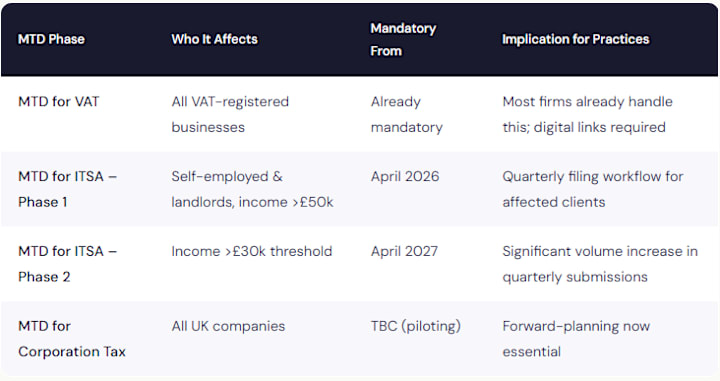
For practices with several hundred self-employed and landlord clients, MTD for ITSA alone quadruples the number of submission touchpoints per client per year. A client who previously required one annual tax return now requires four quarterly updates plus an end-of-year submission.
Practice management software that integrates with HMRC's API and with bridging software provides the workflow scaffolding needed to manage this at scale tracking which clients have submitted, which are outstanding, and which are at risk of penalties.
Top Practice Management Platforms for Accountants in the UK
The market has matured considerably. Here are the Practice Management Platforms for UK Accountants most widely used by UK accounting practices, along with their distinctive strengths:
Karbon
Widely regarded as one of the best in class for collaborative workflow management. Karbon's email integration is its standout feature it pulls client emails into job workflows automatically, giving the whole team visibility on client communications without additional data entry. Strong for medium to large firms with complex workflow needs.
Accountancy Manager
Built specifically for UK practices, with deep Companies House and HMRC integration. Particularly strong for sole practitioners and smaller firms that need a comprehensive but accessible system. The automated AML checks and engagement letter tools are well-regarded.
CCH iFirm (Wolters Kluwer)
Enterprise-grade platform favoured by larger regional and national firms. Deep integration with CCH's tax and accounts production suite. Best suited to practices already embedded in the CCH ecosystem where end-to-end data flow is a priority.
Senta
UK-built with a focus on automation and client communication. Senta's workflow automation tools are particularly flexible practices can build highly customised sequences including client-facing tasks, automated reminders, and conditional logic. Popular with tech-forward smaller firms.
Pixie
A strong contender for smaller practices that feel larger systems are over-engineered for their needs. Clean interface, easy adoption, solid client reminder tools, and transparent pricing make it an accessible starting point for firms moving off spreadsheets.
TaxCalc Practice Manager
Tightly integrated with TaxCalc's tax return software. For firms already using TaxCalc for compliance work, the seamless data flow between the two products reduces duplication. Strong for compliance-heavy practices that want a tightly coupled ecosystem.
Remindoo complements all of these platforms. Where native reminder functionality is limited or inflexible, Remindoo's automated client reminder sequences integrate with your existing practice management system to handle the entire communication workflow from initial information requests through to receipt confirmation.
How to Choose the Right Software for Your Practice
Selecting practice management software for uk accountants is one of the highest-leverage decisions a firm principal makes. The wrong choice costs time in migration, disrupts staff, and can damage client relationships. The right choice compounds in value for years. Here's how to approach the decision systematically:
Audit your current pain points
Before looking at any demo, document the specific bottlenecks costing your firm time and money. Is it chasing clients? Missing deadlines? Unbilled time? Poor visibility on job status? Your top three pain points should be non-negotiable requirements in any system you evaluate.
Define your integration landscape
List every tool your firm currently uses: tax software, accounting software, email, document storage, Companies House, HMRC online. Your practice management platform must integrate cleanly with these or provide a credible migration path. Poor integrations create double-entry and erode trust in the system.
Right-size for your firm
Enterprise systems like CCH iFirm have capabilities that overwhelm a five-person practice. Equally, lightweight tools that work for sole practitioners hit ceilings in a 20+ staff firm. Be honest about where you are now and where you'll realistically be in three years.
Evaluate the client-facing experience
Your practice management software isn't just internal the client portal, request emails, and reminder messages represent your brand to clients. Request a demo of the client-facing journey, not just the staff dashboard.
Trial with real data, real workflows
Don't evaluate on a dummy dataset. Request a proper trial using one of your actual service workflows for example, a personal tax return from client information request through to filing. Any friction you encounter in a trial will be magnified in production.
Check UK-specific compliance features
Confirm UK data residency, GDPR compliance documentation, ICO registration, and whether the system supports HMRC API connections. International systems sometimes have gaps in UK regulatory requirements that only surface once you're committed.
The Real ROI: What UK Firms Are Seeing
The return on investment from practice management software spans several dimensions. Here's what UK practices report in aggregate after 12 months of full implementation:
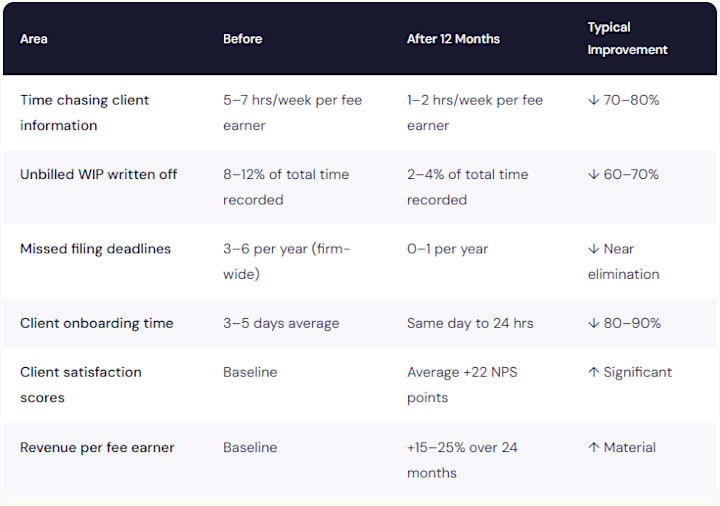
The revenue uplift often surprises firms most. It comes from a combination of recaptured unbilled time, the capacity to take on more clients without additional headcount, and the ability to offer more advisory services once compliance work is managed efficiently.
Final Thoughts
Practice management software is no longer a "nice to have" for UK accounting firms it is the infrastructure of a sustainable, scalable practice. The combination of MTD's rising volume requirements, client expectations for digital communication, and a tight talent market make manual processes an increasingly expensive liability.
Choosing the right platform requires honest self-assessment of your current pain points, careful evaluation of UK-specific compliance features, and a structured implementation plan that wins genuine team buy-in. The firms that treat this as a strategic investment rather than a software purchase are the ones that see transformational results.
And when it comes to the single most impactful quick win within any practice management setup, don't overlook automated client reminders. The time your team reclaims from chasing clients is time that can be reinvested in the advisory conversations that deepen client relationships and drive referrals.
At Remindoo, we've built our platform around exactly this insight that the right reminder, sent at the right time, doesn't just save your team time. It genuinely improves the client's experience of your firm. That's the kind of ROI that compounds.

 Arabic
 French
 Spanish
 Portuguese
 Deutsch
 Turkish
 Dutch
Dutch
 Italiano
 Russian
 Romaian
 Portuguese (Brazil)
 Greek
Greek